UREVO CyberPad Smart Walking Pad review for home office buyers comes down to one thing: it tries to turn short, desk-friendly walks into a more useful workout.
If you want a compact treadmill-style machine with incline, app features, and a quiet motor claim, this one is built for that lane.
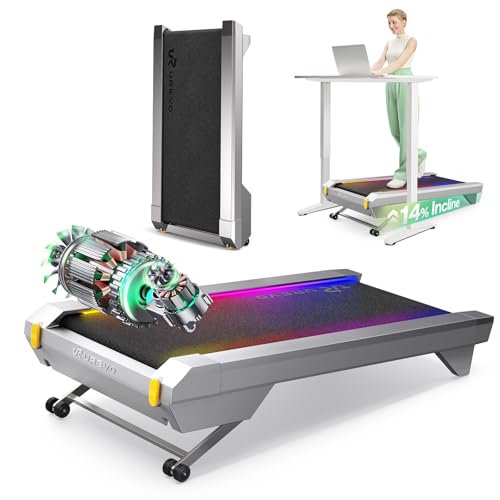
CyberPad Smart Walking Pad Review Summary
The UREVO CyberPad Smart Walking Pad is aimed at people who want more than a basic flat walking pad.
Its strongest pitch is the combination of a 14% auto incline, a brushless motor, and app-based workout tracking, which makes it more interesting for buyers who care about efficiency, structure, and low-disruption use in a home office.
Best fit: remote workers, apartment users, and anyone who wants a walking pad that feels more like a guided fitness device than a bare-bones under-desk treadmill.
Less ideal: buyers who only want a simple, no-frills walking platform and do not care about app features or incline.
Review Scorecard
| Category | Score | Why it earns that score |
|---|---|---|
| Incline training | 9/10 | The 14% auto incline is the standout feature and gives this model a clearer training advantage than flat walking pads. |
| Home office fit | 9/10 | The quiet-operation claim and compact, under-desk positioning make it well suited to work-from-home routines. |
| Workout variety | 8/10 | App tracking, goals, ranking, and virtual route-style features add structure beyond plain walking. |
| Durability potential | 8/10 | The sealed brushless motor and long-lifespan positioning suggest a more durable design than older brush-motor models. |
| Ease of use | 8/10 | Digital controls and automatic incline keep the experience straightforward once set up. |
| Space-conscious design | 7/10 | It is clearly intended for compact use, though the incline system and feature set make it less minimalist than basic pads. |
| Overall value fit | 8/10 | The feature mix is strong for buyers who will actually use incline and app tools; less compelling if you only want a simple walker. |
The main reason to buy the CyberPad is not that it is a treadmill replacement in the gym sense.
It is that it tries to make walking more productive in ordinary daily life.
That makes it appealing for people who will use it often enough to benefit from small changes in difficulty, tracking, and consistency.
Key Features and Specifications of CyberPad Smart Walking Pad
The listing centers on a few concrete details.
The CyberPad uses a 2.5HP sealed brushless motor, which the manufacturer ties to longer lifespan and lower maintenance.
It also advertises a 14% auto-adjustable incline, a sub-35dB quiet-operation claim, a spacious walking surface, digital controller, speed lights, and an AI-powered app.
The app is presented as more than a logging tool.
According to the listing, it can save daily metrics such as distance, time, calories, and speed, support virtual-route style experiences, provide music synced to pace, and let users set goals and compare progress.
That turns the device into a more guided product rather than just a motorized deck.
Here is the core feature set in plain terms:
- Motor: 2.5HP sealed brushless motor
- Incline: automatic incline up to 14%
- Noise claim: less than 35dB
- Control: digital controller
- App support: workout logging, goals, ranking, virtual routes, and music features
- Intended use: home office walking, desk-adjacent activity, and compact indoor fitness
The listing also emphasizes a durability angle, saying the motor has a lifespan of at least 6,000 hours and that a brushless design reduces maintenance needs.
That is a manufacturer claim, not a test result, but it does matter when comparing this against very inexpensive walking pads that usually focus only on the lowest price and simplest hardware.
One practical point is that the incline changes the product category.
A flat walking pad is mostly about movement.
An incline walking pad is about making that movement count more, especially if your time is limited and you want a tougher session without needing to run.
Pros and Cons of CyberPad Smart Walking Pad
Pros
- The 14% auto incline is a real differentiator. It gives the machine a stronger fitness case than standard flat walking pads.
- The brushless motor positioning suggests lower maintenance. That matters for buyers who want a long-term office fitness device.
- The app features add structure. Logging, goals, and ranking can make it easier to stay consistent.
- Quiet-operation positioning makes it more office friendly. The listing explicitly targets work sessions and shared living spaces.
- The design feels more modern than a bare walking board. Speed lights and digital controls make it feel like a more complete product.
Cons
- It is more complex than a basic walking pad. Buyers who want the simplest possible setup may not use the extra features.
- The app-led experience may be optional rather than essential. If you ignore the app, you may not be getting full value from the product.
- The incline focus may not suit everyone. Some users want a flatter, gentler walking surface for long sessions.
- The claims are mostly listing claims. There is no hands-on evidence here, so buyer judgment should stay grounded in the published specs.
The biggest tradeoff is simple: you are paying attention to features that are only valuable if you actually use them.
If you want a machine that just sits under a desk and gets ignored after the novelty wears off, this is probably too feature-rich.
If you want a walking pad that pushes you toward more meaningful daily movement, the added complexity is justified.
Who Should Buy CyberPad Smart Walking Pad?
This is a good fit for people who want to build walking into workdays.
Remote workers, home office users, and buyers in small living spaces are the obvious audience.
The quiet-operation claim and compact format make sense if you want movement during calls, focus blocks, or short breaks.
It also suits buyers who like measurable routines.
If you respond well to app-based tracking, goal setting, and feedback loops, the CyberPad has more to offer than a generic under-desk treadmill.
The incline feature is especially relevant if you care about time efficiency and want a walking session to feel less casual.
You should probably skip it if:
- You only want an extremely simple walking pad with minimal electronics.
- You do not care about app support, tracking, or goal-based training.
- You want a purely flat, low-intensity walking surface for very long sessions.
- You are not interested in incline as a training tool.
In short, this is for buyers who want walking to feel intentional.
It is not just a convenience item; it is a compact fitness device with a stronger training identity than most desk-walking products.
Incline and App Use Cases of CyberPad Smart Walking Pad
Why the 14% Auto Incline Matters
The incline is the feature that gives this product its clearest purpose.
A walking pad with automatic incline changes the feel of a session without requiring a run or a large footprint.
For time-crunched users, that can be the difference between “I walked a bit” and “I actually worked out.”
What the App Adds
The app is positioned as a support system for consistency.
Saving daily data, setting goals, and following virtual routes makes the CyberPad more appealing to users who need structure to keep moving regularly.
That is not essential for everyone, but it is valuable if motivation is usually the bottleneck.
Why Quiet Operation Matters
Quiet hardware matters most in shared spaces.
A sub-35dB claim is useful because it addresses the biggest objection to home-office fitness gear: nobody wants a loud machine interrupting a meeting or making a room feel mechanical.
Whether the real-world result matches the claim is another matter, but the intention is clear.
The Brushless Motor Angle
Brushless motor design matters because it is usually associated with better longevity and less maintenance than older brushed designs.
The listing’s lifespan and efficiency claims point in that direction.
For a product meant to live under a desk and get used repeatedly, that is a sensible engineering priority.
Alternatives to CyberPad Smart Walking Pad
If you want a more basic home walking pad, search Amazon for UREVO walking pad models that skip the incline emphasis and keep the experience simpler.
If you want a sturdier office treadmill style product, look at WalkingPad treadmill options, which are often discussed alongside compact desk-walking use cases.
If you want a brand with a broad under-desk treadmill lineup, search for Goplus walking pad or Sperax walking pad alternatives and compare feature sets against incline, app support, and deck size.
If you prefer the cheapest path into desk walking, a plain under desk treadmill search will surface more minimal models that may be better if you do not need smart features.
The key comparison is not just brand versus brand.
It is feature depth versus simplicity.
The CyberPad makes the strongest case when you value incline and app-guided use; otherwise, a simpler walking pad may be the better fit.
Is CyberPad Smart Walking Pad Worth It?
Yes, if you will use the incline and app features.
The UREVO CyberPad Smart Walking Pad looks worth considering for home office buyers who want a compact walking device with more training value than a flat pad can offer.
It is not the right choice for everyone, though.
If you only want basic walking with no learning curve, no app dependence, and no incline, a simpler model will probably be the smarter buy.
But if you want a more purposeful under-desk fitness setup, this one has a clear argument.